
Quick Answer
Boolean search for recruiters combines keywords with logical operators — AND, OR, NOT, quotation marks and parentheses — to narrow candidate searches. On Google, the operators Google documents today are quotation marks, site:, the minus sign, before:, after: and filetype:. Several operators recruiters were taught, including + and ~, were retired years ago and now do nothing.
You've been handed the job order nobody else wants. You pasted in a Boolean string from a sourcing blog, hit enter, and got either nothing or 40,000 recruiters. Sound familiar?
Here's the uncomfortable part: a lot of the Boolean advice still circulating was written for a Google that no longer exists. Google quietly retired operators that recruiters were taught to rely on, and most guides never updated. Recruiters spend an average of 14.6 hours a week searching for the right candidates, according to Bullhorn's GRID 2025 research (more than 1,500 respondents, February 2025). That's a lot of hours to spend on strings that half-work.
This guide gives you the operator set Google actually documents, 12 ready-to-run strings you can copy in one click, and a straight answer to the question everyone's really asking: does any of this matter now that search is going semantic?
TL;DR — Key Takeaways
| Operator | Still works on Google? | Use it for |
|---|---|---|
| "exact phrase" | Documented | Job titles, certifications |
| site: | Documented (but incomplete results) | X-Ray on LinkedIn, GitHub |
| -term | Documented | Excluding recruiters, job ads |
| filetype: | Documented | Finding CVs and portfolios |
| before: / after: | Documented | Recency filtering |
| OR / AND | Not on Google's documented list | More dependable inside LinkedIn and your ATS |
| + | Retired October 2011 | Use quotation marks instead |
| ~ (synonyms) | Dropped mid-2013 | List synonyms yourself with OR |
What Boolean Search in Recruitment Actually Is
The logic is named after George Boole, a 19th-century mathematician. That's all the history you need. In recruiting, Boolean search means telling a search box exactly which words a profile must contain, which ones are interchangeable, and which ones rule it out.
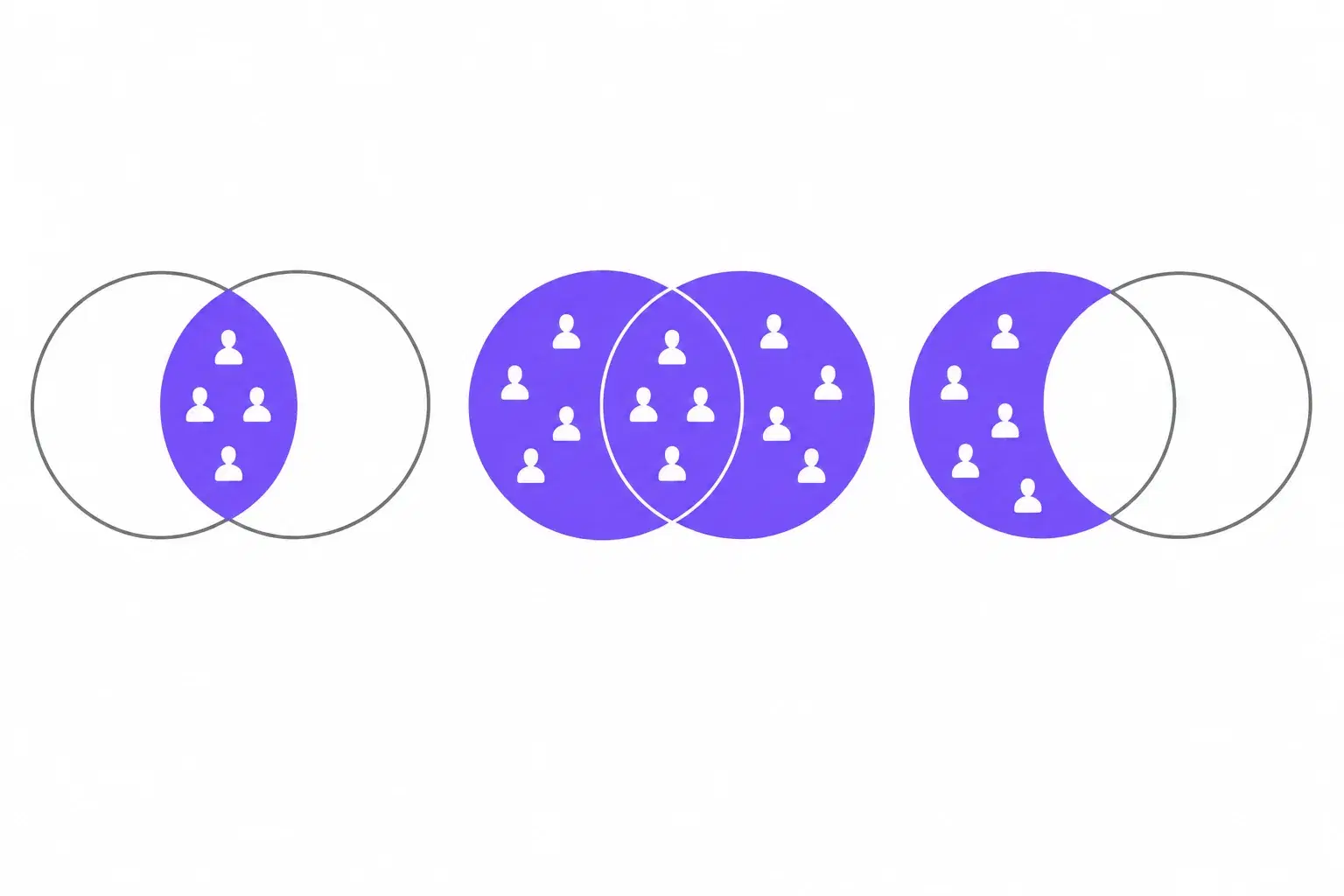
Four building blocks do almost all the work:
AND — every term must appear. React AND TypeScript returns fewer, tighter results.
OR — any of the terms can appear. Developer OR engineer catches both ways people describe the same job.
NOT (or the minus sign) — removes anything containing the term. Useful for stripping out recruiters and job ads.
Grouping — quotation marks lock a phrase together; parentheses make OR apply to the right words.
Even if Google changes the rules again, this logic isn't going anywhere. It's how most ATS keyword searches, job board résumé databases and LinkedIn's own search filters are built. Google is just the place where the rules moved most without anyone announcing it loudly.
The Google Boolean Search Operators That Still Work
Google's own Refine web searches help page documents six operators: quotation marks, site:, the minus sign, before:, after: and filetype: (it also shows before: and after: combined as a date range). OR, AND, +, ~, * and related: don't appear on it. That's the defensible claim: not "only these work," but "these are the ones Google publishes."
Here's the full cheat sheet, side by side with LinkedIn and a typical ATS. Bookmark it — or link to it.
| Operator | What it does | LinkedIn Recruiter | Most ATS | Recruiter example | |
|---|---|---|---|---|---|
| "exact phrase" | Matches the words together, in that order | Documented | Commonly supported — confirm in LinkedIn help | Usually supported | "senior react developer" |
| site: | Limits results to one site or path | Documented (incomplete results) | Not applicable | Not applicable | site:linkedin.com/in |
| - (minus) | Excludes a word, phrase or site | Documented | Use NOT — confirm in LinkedIn help | Varies; NOT is more common | -recruiter -"talent acquisition" |
| filetype: | Limits results to a file format | Documented | Not applicable | Not applicable | filetype:pdf |
| before: / after: | Limits results by page update date | Documented | Not applicable | Not applicable | after:2025-06-01 |
| OR | Matches any of the listed terms | Not on documented list | Commonly supported — confirm in LinkedIn help | Usually supported | ("developer" OR "engineer") |
| AND | Requires every term | Not on documented list (Google matches all words by default) | Commonly supported — confirm in LinkedIn help | Usually supported | react AND typescript |
| NOT | Excludes a term | Not on documented list — use the minus sign | Commonly supported — confirm in LinkedIn help | Usually supported | NOT junior |
| ( ) parentheses | Groups terms so OR applies to the right words | Not on documented list | Commonly supported — confirm in LinkedIn help | Usually supported | ("react" OR "vue") "austin" |
| * wildcard | Stands in for unknown words or endings | Not on documented list | Check LinkedIn help | Varies widely | "senior * engineer" |
Last verified: October 14, 2026. Google column checked against Google Search Help's Refine web searches page. LinkedIn behaviour differs by product — Recruiter, Recruiter Lite, jobs search and Talent Insights each have their own help page — so confirm against LinkedIn's help docs for the product you use. ATS support varies by vendor.
The operators Google retired
+was removed in October 2011. Google's advice at the time was to use quotation marks instead, having "expanded the functionality of the quotation marks operator" (Search Engine Land, 2011).~(synonyms) was dropped in mid-2013. Google's Dan Russell explained it was "because too few people were using it to make it worth the time, money, and energy to maintain" (Search Engine Land, 2013).AND,ORand*aren't on Google's documented list. Behaviour varies, and you shouldn't build a critical search on them alone.
If your saved strings are full of + and ~, they're not doing what you think. They're doing nothing, quietly, which is worse.
Why site: doesn't return everything
Why your site: search misses people
Google's own developer documentation says: "The site: operator doesn't necessarily return all the URLs that are indexed under the prefix specified in the query." It also warns that site:https://www.example.com and site:https://example.com/ can return different results, and that bigger sites "shouldn't expect to see all their URLs in the results."
Google Search Central, How to use the site search operator
That one sentence explains most X-Ray frustration. LinkedIn is about as big as sites get. Your site: search was never going to show you every matching profile — it shows you a slice. The fix isn't a cleverer string. It's running several narrower strings and comparing what comes back.
LinkedIn Boolean Search vs Boolean on Google
LinkedIn is still where most sourcing happens: in the 2024 Employ Recruiter Nation Report (1,200+ talent acquisition decision makers), 71% of recruiters named LinkedIn among their most valuable social channels. But "Boolean on LinkedIn" means two different things.
LinkedIn's own search
Inside LinkedIn, you're searching LinkedIn's database with LinkedIn's rules. Sourcers typically type uppercase AND, OR and NOT, quotation marks and parentheses in keyword fields. The catch: operator support differs by LinkedIn product. Recruiter, Recruiter Lite, jobs search and Talent Insights each have their own official help page on Boolean, and they don't all say the same thing.
We're not going to paraphrase those pages from memory, because this is exactly the kind of detail that changes. Open LinkedIn's help page for the product you're paying for and check it before you build a search you'll reuse.
X-Ray search: searching LinkedIn through Google
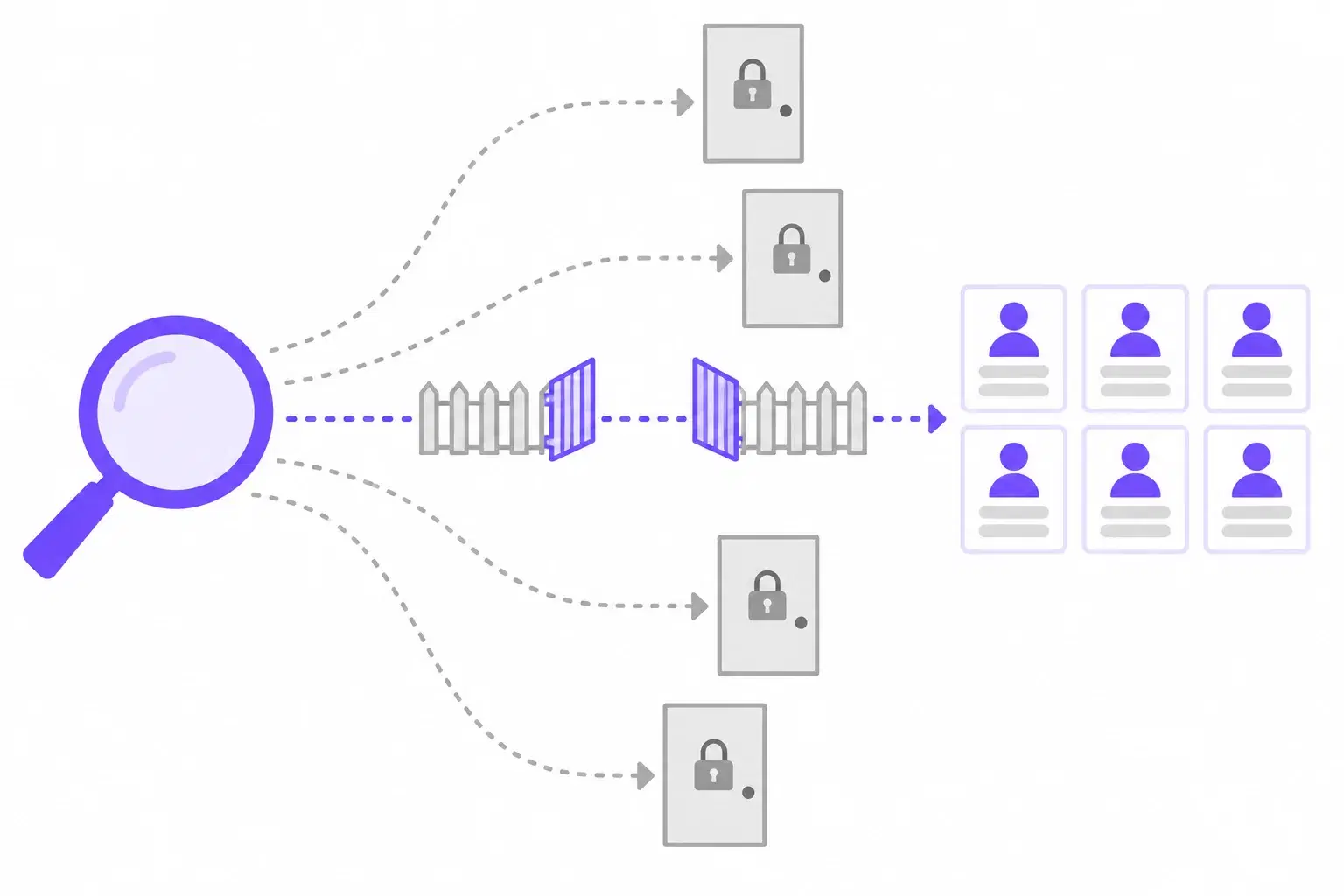
X-Ray search uses Google's site: operator to search inside another site — most often site:linkedin.com/in, which is the path for public profiles. You're searching Google's copy of those pages, not LinkedIn itself, so you can reach people outside your network using Google's operator rules instead of LinkedIn's.
Why X-Ray works at all — and what LinkedIn says about scraping
Why X-Ray works
LinkedIn's robots.txt gives Googlebot and Bingbot their own explicit rulesets, and neither disallows /in/ — the public profile path. Every crawler without its own rules hits the catch-all: User-agent: * / Disallow: /. That's why searching LinkedIn through Google works and scraping it yourself doesn't. You can check it in ten seconds.
The same file opens with a plain warning: "The use of robots or other automated means to access LinkedIn without the express permission of LinkedIn is strictly prohibited." Running a Google search and clicking a result is normal browsing. Pointing a scraper at the results is not, and LinkedIn's User Agreement restricts it too. Search by hand, view profiles normally, and read the terms before you plug in any automation.
12 Ready-to-Run Boolean Search Strings
Every string below uses a senior React developer in Austin as the example. Swap the role, skills and location; keep the structure. Each one has a copy button, a one-line "what this does," and the trap to watch for.
A note on OR: OR and wildcards aren't on Google's documented list, but they still work. Because they're undocumented, Google can change or drop them without notice — which is exactly what happened to + and ~. Where a search matters, run your title variants as separate queries as well.
LinkedIn X-Ray strings
1. By title, skill and location
Finds public LinkedIn profiles that mention the skill, any of three title variants, and Austin.
site:linkedin.com/in "react" ("senior software engineer" OR "senior developer" OR "frontend engineer") "austin"Watch out for: site: returns incomplete results by Google's own admission. Run each title variant as its own search too, not only as one OR block.
2. By current employer
Targets a specific company's team. Replace EMPLOYER NAME with the company, kept in quotes. The exclusions strip profiles written like job ads.
site:linkedin.com/in "EMPLOYER NAME" "react" "austin" -"looking for" -"hiring"Watch out for: Google can't tell a current employer from a past one in profile text. Expect alumni and filter by hand.
3. By certification or credential
Finds people who list one of two specific certifications and mention Austin.
site:linkedin.com/in ("aws certified solutions architect" OR "certified kubernetes administrator") "austin"Watch out for: People list certifications they're studying for, or that have lapsed. Verify before you submit anyone.
GitHub and technical sources
4. By language and location
Surfaces GitHub pages with a location signal and a language signal, minus the /orgs/ admin pages.
site:github.com "austin" ("react" OR "typescript") -site:github.com/orgsWatch out for: Organisation profiles share the same URL pattern as people, so some company accounts still get through. Skim before you save.
5. By recent activity
Narrows to GitHub pages Google considers updated after a given date.
site:github.com "react" "austin" after:2025-06-01Watch out for: after: filters on Google's view of when a page was updated, not on commit history. Treat it as a rough freshness filter.
Résumé and portfolio files
6. CV hunting by file type
Finds PDF résumés people have published publicly, minus job descriptions and ads.
filetype:pdf ("resume" OR "curriculum vitae") "react" "austin" -"job description" -"apply now"Watch out for: These are documents people chose to publish, but they're still personal data. Check your jurisdiction's rules before you store anything.
7. Portfolio and personal sites
Looks for personal developer sites on two popular top-level domains, excluding the big platforms.
("react developer" OR "frontend engineer") "austin" (site:.dev OR site:.io) -site:linkedin.com -site:indeed.comWatch out for: Using site: with a bare top-level domain works in practice but isn't spelled out in Google's help page. If it returns nothing, run site:.dev and site:.io separately.
Exclusion patterns
8. Strip out recruiters and agencies
Removes the recruiters and staffing firms who crowd the results for any in-demand skill.
site:linkedin.com/in "react" "austin" -recruiter -recruitment -staffing -"talent acquisition" -headhunterWatch out for: You'll also lose engineers who mention recruiting in their profile ("helped recruit our team"). Usually worth it, but know it happens.
9. Strip out job ads to find people
Removes job postings and the big job boards so what's left is mostly people and their own pages.
"react developer" "austin" -"apply" -"job description" -"we are hiring" -site:indeed.com -site:glassdoor.com -site:ziprecruiter.comWatch out for: -"apply" is a blunt instrument. If results thin out too much, drop it first.
Niche sources
10. Conference speakers
Finds people who've spoken at React or JavaScript events and mention Austin.
("speaker" OR "speaking" OR "presented at") ("react conf" OR "reactathon" OR "js conf") "austin"Watch out for: Speakers are pre-qualified for depth and are rarely sitting in anyone's ATS. They also get approached more than most, so personalise the outreach.
11. Professional association and licensing directories
Finds member directories on .org sites. Shown with a healthcare example, because this pattern earns its keep in licensed professions.
site:.org ("member directory" OR "find a member") "registered nurse" "texas"Watch out for: Directories often sit behind a search form Google can't crawl. The string finds the directory; you may need to search inside it yourself.
12. Industry awards and recognition lists
Finds recent award, finalist and "40 under 40" pages for engineers in Austin, outside LinkedIn.
("award" OR "winner" OR "finalist" OR "40 under 40") "engineering" "austin" after:2024-01-01 -site:linkedin.comWatch out for: Award lists name people, not contact details. Pair each name with a LinkedIn X-Ray (string 1) to find the profile.
Running a lot of these every week? That's usually a sign the sourcing step itself is ready to be systematised — see our guide to recruitment automation for staffing agencies, and for volume roles, the high-volume hiring playbook.
How to Write a Boolean Search String That Actually Works
Copying strings gets you started. Writing your own is what fills the hard job orders. Five habits separate the two.
1. Start from the résumé, not the job description
Clients write job descriptions in their language: "Principal Experience Engineer, Customer Platforms." Candidates write profiles in theirs: "Senior frontend developer, React." Boolean only matches words that are actually on the page, so search the words the people you want would use. Pull three profiles of people you'd happily submit and borrow their vocabulary.
2. Stack synonyms with OR
Since Google dropped ~, nobody is guessing synonyms for you. Build the list yourself: ("frontend engineer" OR "front end developer" OR "UI engineer"). Keep the parentheses — without them, OR can attach to the wrong words and blow the search wide open. And remember the caveat above: on Google, also run the most important variants on their own.
3. Watch the seniority trap
NOT junior feels like a quick way to filter for senior people. It also removes the senior engineer who writes "mentored junior developers" — arguably exactly the person you want. Every exclusion removes a word wherever it appears, not just in the job title. Before you keep an exclusion, run the search with and without it and look at what disappeared.
4. Test, narrow, widen — a four-step loop
- Run the string and read the whole first page of results.
- Count how many you'd actually contact. Under a handful? Widen.
- Change one element — add a synonym, drop an exclusion, loosen the location.
- Run it again and compare. If you changed three things at once, you'll never know which one helped.
5. Save the string, not just the results
The candidates you find today go stale. The string that found them doesn't. Save working strings against the job order, so the next desk that gets a similar role starts from something proven instead of a blank search box. If you track sourcing performance, it's also how you learn which channels actually produce placements — more on that in recruitment metrics for staffing agencies.
Boolean vs AI Search: Which Do You Actually Need?
This is the question behind the question. 54% of recruitment firms already use automation for candidate search, according to Bullhorn's GRID 2026 report (around 2,300 respondents). So is Boolean a dying skill?

Boolean is better at
- Precision — exactly these words, never those
- Auditability — you can show a client why someone appeared
- Reproducibility — same string, same logic, every time
- Hard exclusions
- Sourcing outside your database, on the open web
Semantic AI search is better at
- Recall on unfamiliar or invented job titles
- Spotting transferable skills
- "Find me more people like this one"
- Ranking thousands of records quickly
- Mining inside your own database at scale
The honest caveat
There is no rigorous published study comparing Boolean recall and precision against semantic matching for candidate search. The numbers that circulate come from vendors selling semantic search. Anyone who tells you AI finds "X% more candidates" than Boolean is quoting marketing, not research.
So here's the practical answer: Boolean for sourcing on the open web, semantic search for mining your own database. Most agencies need both.
Think about where the hard part actually sits. On the open web, you need control — the exclusions, the exact credential, the specific competitor. Boolean gives you that. Inside your ATS, the problem is different. You've got years of candidates who were screened for one job order, didn't land it, and never got looked at again — usually because they described themselves in words your string didn't guess. That's a recall problem, and recall is where semantic matching earns its keep.
LinkedIn's own talent resources put the share of workers actively looking at 36% — meaning roughly two-thirds of the workforce isn't actively searching (LinkedIn Talent Solutions). Many of those people are already sitting in an agency database somewhere. A well-built string finds new ones. It rarely finds the ones you already paid to source.
Keep your strings. Let AI mine the database.
HRmony's Pulse ranks every candidate already in your ATS against an open role in under 2 minutes — semantic matching, no string required. Aura enriches every profile 24/7 from 70M+ profiles across 50+ countries, so the records you match against stay current. Boolean still does the open-web sourcing; this handles the part it was never good at. See what's included on the pricing page.
See How It Works →Further Reading
FAQ: Boolean Search for Recruiters
What is Boolean search in recruitment?+
What are the main Boolean operators?+
Does Boolean search still work on Google in 2026?+
Does OR work on Google?+
What is X-Ray search?+
Is X-Ray search on LinkedIn allowed?+
How do you write a Boolean search string?+
Is Boolean search obsolete now that AI can find candidates?+
Martin Gordon
Co-founder & CEO, HRmony.ai
Martin has 15+ years in recruiting technology and talent operations. He co-founded HRmony.ai on the belief that AI should sit inside a recruiter's workflow — mining the database, keeping profiles current — while recruiters keep the judgment and the craft, Boolean included. About HRmony